Vintage Pink Indigo Roses Patterns Set: Practical Insights for Designers and Creators
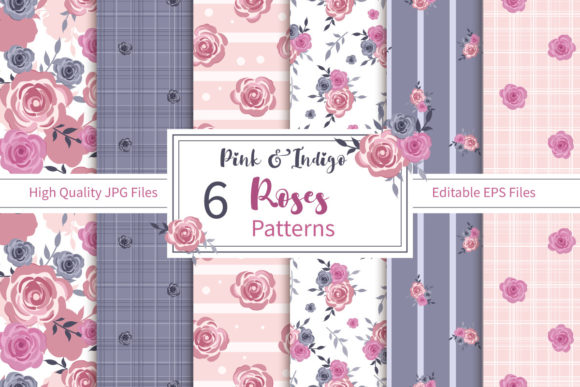
The Vintage Pink Indigo Roses Patterns Set brings together delicate floral motifs in a muted yet striking palette. Designed for both digital and print projects, it includes six seamless patterns in high-resolution JPG (300 dpi) and fully editable EPS files. Whether you’re making planner stickers, wrapping paper, fabric prints, or social media graphics, having versatile pattern files saves time and expands your creative options. However, even a well-crafted pattern set can lead to disappointing results if you overlook a few practical details. Below we explore common misunderstandings, mistakes, and better approaches to help you get the most from this collection.
One File Format Is Not Always Enough – Why Both JPG and EPS Matter
A frequent oversight is assuming that the JPG version alone will cover all your needs. While the 300 dpi JPGs are excellent for web use, digital scrapbooking, and quick mockups, they are flattened raster images. This means resizing them larger than the original can cause pixelation, and you cannot easily change individual colors or elements. That is where the EPS files become essential. EPS is a vector-based format that remains crisp at any size and allows you to edit shapes, recolors, and even extract individual rose motifs. Many creators who skip the EPS files end up frustrated when they need a larger pattern for a banner or a different hue for a branding project. To avoid this, always open the EPS in a compatible program like Adobe Illustrator or Inkscape and explore the editable layers before committing to a final design. This small step can save hours of rework.
The True Meaning of “Seamless” – What to Check Before You Use the Pattern
The term “seamless pattern” implies a perfect tile that repeats without visible edges. While these patterns are professionally constructed, their seamlessness can be affected by how you tile them in your software. A common mistake is simply placing the JPG full-bleed on a canvas and assuming it will repeat flawlessly. In reality, you need to verify the pattern repeat via software like Photoshop, Illustrator, or Procreate using the pattern preview or tile functions. A more reliable approach is to use the EPS file to create a custom swatch in your design application. This ensures that the repeat aligns correctly and that no unintended gaps or mismatches appear, especially if you’re printing on fabric or creating wrapping paper where seams are critical. Testing your pattern on a small sample first will help you avoid waste and disappointment later.
Color Expectations vs. Printing Reality – Calibrate Before You Commit
The Vintage Pink Indigo Roses Patterns Set features a beautiful combination of muted pink and deep indigo tones. However, the colors you see on your monitor may differ significantly from a printed output. Many hobbyists and small business owners make the mistake of relying solely on screen colors without adjusting for the printer and paper type. This can lead to a pattern that looks muddy or too dark when printed on matte cardstock or fabric. To mitigate this, request a physical sample from your print provider or do a test print at home using the same paper you plan to use for the final project. If you need precise color matching, edit the EPS file using CMYK color mode rather than RGB. Most commercial printing services prefer CMYK. Additionally, remember that 300 dpi is ideal for print, but if you are scaling down the pattern significantly, you can reduce resolution without losing quality – just avoid scaling up the JPG beyond its original dimensions.
Pattern Scale and Project Context – One Size Does Not Fit All
One of the most overlooked factors is the scale of the pattern relative to your project. A rose pattern that looks beautifully detailed on a 12x12 inch scrapbook page might overwhelm a small business card or an A7 invitation. Conversely, a pattern that appears subtle on your screen may look tiny and repetitive when printed on a large tote bag. The EPS files in this set give you the ability to scale the pattern without losing quality, but you need to actively adjust the size. A better approach is to create a mockup of your final product – for example, place the pattern on a business card template at its native scale, then experiment with scaling it down to 50% or up to 150% to see what feels balanced. Many designers ignore this step and later wish they had tested different size versions. Always preview the pattern at the approximate size it will appear in the final piece.
Commercial Use: Read the Fine Print Before You Sell
This pattern set is marketed for a wide range of projects including commercial products like fabric prints, stationery, and party decor. However, the specific licensing terms can vary between sellers. A common misunderstanding is assuming that “commercial use” means unlimited resale without any restrictions. Some pattern sets may be limited to a certain number of products, or they may prohibit the resale of the digital files themselves as a pattern collection. If you are a small business owner or freelancer planning to use the Vintage Pink Indigo Roses Patterns Set for items you sell, take a moment to review the license included with your purchase. Look for details about permissible quantities, credit requirements, and whether modifications are allowed. If the license is unclear, contact the creator for clarification. This proactive step prevents legal headaches and ensures you can confidently build a product line around these beautiful designs.
Overlooking Workflow Efficiency – Organizing and Naming Files
When you download the zipped folder containing six JPGs and six EPS files, it is tempting to simply extract and start using the pattern that catches your eye first. Without proper organization, however, you can waste time searching for the exact variant or editing the wrong file. A practical habit is to rename the files based on a system that helps you identify color or motif features quickly – for example, “VintagePinkIndigo_Roses_Large.jpg” or “VintagePinkIndigo_Geometric_EPS”. Also, keep a copy of the original ZIP file as a backup. Many creators also create a dedicated project folder with subfolders for different uses (e.g., “planner_stickers”, “fabric_print”, “web”). This small investment in file management pays off when you return to the pattern set months later for a new project.
Combining Patterns with Other Elements – A Caution Against Overcrowding
Because the Vintage Pink Indigo Roses Patterns Set already contains rich floral details, there is a temptation to layer them with other busy patterns or heavy typography. This often results in a cluttered, hard-to-read design, especially for products like greeting cards or social media posts. A better approach is to use these patterns as a background or accent rather than the main focal point. For example, place a solid-colored panel over a portion of the pattern and add text on that panel. Alternatively, reduce the opacity of the pattern layer in your editing software so it acts as a gentle watermark. This maintains the vintage charm without overwhelming other design elements. If you are using the pattern for planner stickers, consider pairing it with minimal fonts and simple icons to keep the layout balanced.
Final Thoughts – Making Informed Choices with Your Pattern Set
The Vintage Pink Indigo Roses Patterns Set is a versatile resource for anyone who loves combining vintage aesthetics with practical digital assets. By understanding the differences between the JPG and EPS files, testing your pattern repeats, calibrating colors, adjusting scale, and respecting licensing, you can avoid the common pitfalls that lead to wasted time and materials. Whether you are an experienced designer or a hobbyist exploring scrapbooking for the first time, taking these small extra steps will elevate your results and ensure that every project reflects the beauty of the patterns you invested in. Keep experimenting, and remember that the best outcomes come from working smartly with the tools you have.