Modern Geometry 12 Vector Patterns: A Practical Evaluation
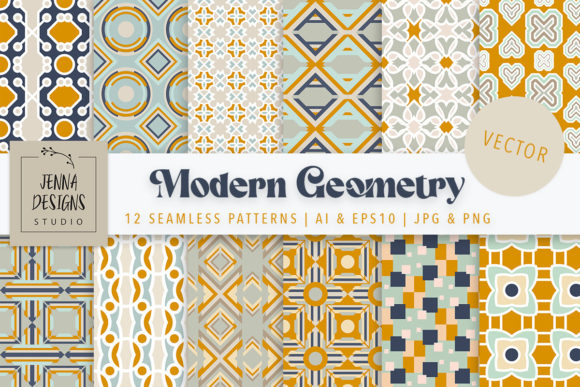
Modern Geometry 12 Vector Patterns is a curated collection of twelve seamless geometric designs bundled within a single digital package. The set includes vector files in Adobe Illustrator CC and EPS10 formats, alongside raster versions in JPG and PNG at 3600 pixels square at 300 DPI, and a Photoshop PAT file for pattern fills. The color palette centers on harvest gold, yellow, tan, navy, aqua, and cream, with a mix of small and large scale patterns intended to facilitate mixing and matching across various design projects.
This article evaluates the collection from a practical standpoint. We examine what it offers, who might benefit from it, where it falls short, and what considerations matter when deciding whether to incorporate it into a design workflow or project library.
What the Collection Offers
The core of Modern Geometry 12 Vector Patterns is twelve distinct seamless patterns. Seamless patterns tile without visible edges, making them suitable for backgrounds, textiles, packaging, and print on demand products. The vector files allow users to recolor elements quickly, since vector shapes can be selected and modified with a single click in compatible software. The included PAT file extends utility to Photoshop users who prefer pattern overlays or fills without manually placing each design.
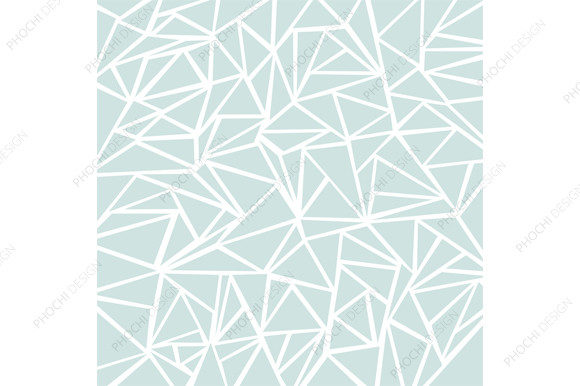
Each pattern exhibits a modern geometric style, which means clean lines, repeating shapes, and balanced compositions. The palette is restrained to six colors, all within a warm-neutral and cool-navy range, giving the collection a cohesive but not monotonous look. Having both small and large scale patterns within one set means users can pair a dense pattern with a more open one, creating visual contrast without needing assets from different sources.
Why Designers and Creators Might Consider This Set
Collections like this one appeal to designers who value efficiency. Instead of sourcing patterns individually, a bundled set offers immediate access to a consistent style. The cohesive color palette reduces the time spent adjusting hues to work together. For branding projects, social media graphics, or packaging design, such consistency is often a requirement rather than a preference.
Another reason for interest is the flexibility of vector files. Users working on large format prints or resizing patterns for different applications benefit from resolution-independent vectors. The EPS10 format is widely compatible across design software, and the AI CC file ensures full editability for Adobe users. Those who prefer raster workflows still receive high-resolution JPG and PNG files, which eliminates the need to export from vectors manually.
The presence of a Photoshop PAT file is a practical addition for users who rely on Photoshop for mockups, social media templates, or compositing. Applying a pattern as a layer style or fill is faster than placing and tiling a separate image file for each pattern.
Benefits and Advantages
Time savings. A single purchase provides twelve coordinated patterns that are ready to use. For a designer working on a brand identity, product packaging, or a set of social media templates, this reduces the research and curation phase. The patterns are pre-matched in color and style, which removes guesswork about compatibility.
Editability. Vector formats allow color changes, scaling, and modifications to individual elements. A pattern designed in navy and cream can be recolored to fit a different brand palette with minimal effort. This extends the useful life of the collection beyond its original colorway.
Print readiness. The JPG and PNG files at 3600 pixels square at 300 DPI are suitable for print on demand products, scrapbooking papers, and small to medium format prints. The resolution is adequate for many print applications without further upscaling.
Versatility across media. Because the patterns are available in both vector and raster formats, they can be used in web design, print design, and digital products without format conversion barriers. The PAT file further streamlines Photoshop-based workflows.
Visual cohesion. The limited color palette and geometric style mean all twelve patterns work together. Designers can mix a small-scale geometric pattern with a larger one and maintain a unified look, which is especially useful for collections of products like stationery sets, fabric lines, or marketing collateral.
Limitations and Tradeoffs
Color palette constraints. The collection uses a specific set of six colors. While these colors are flexible for many applications, users who need a different palette may need to recolor the vectors entirely. Although recoloring vectors is straightforward, it does require time and familiarity with vector editing software. Users without access to Illustrator or compatible vector tools cannot easily modify colors.
Design style specificity. Modern geometric patterns are popular but not universal. A project calling for organic, hand-drawn, or vintage aesthetics would find this collection mismatched. The patterns are clean, structured, and symmetrical, which suits certain brands and products but not others.
Number of patterns. Twelve patterns is a moderate collection size. For a large branding system or a comprehensive product line, a designer may need more variety than twelve patterns can provide. In such cases, this collection might serve as a starting point or accent set rather than a complete solution.
Skill level required for editing. While vector files are editable, users must know how to work with layers, color swatches, and shape tools in Illustrator or similar software. Complete beginners may find the collection useful in its original form but may struggle to customize it.
Format compatibility. The AI CC file requires a relatively recent version of Adobe Illustrator. Users with older versions or non-Adobe software may need to rely on the EPS10 file, which retains editing capabilities but may have some feature limitations. The PAT file is Photoshop-specific and offers no utility to users who do not use Photoshop.
Who Will Find This Collection a Strong Fit
Small business owners and entrepreneurs who create their own branding, social media graphics, and product packaging will benefit from the ready-to-use nature of the set. The cohesive palette and mix of scales make it easier to produce a professional look without hiring a designer or spending hours creating patterns from scratch.
Print on demand sellers who need repeatable patterns for products like mugs, phone cases, fabric, and stationery can use the JPG and PNG files directly. The 3600 pixel square size at 300 DPI meets the resolution requirements of most print on demand platforms.
Graphic designers working on mid-market brand projects where a modern, geometric aesthetic fits the client identity will find the collection a useful resource. The vector editability means the patterns can be adapted to specific brand colors, and the variety of scales allows for practical use across different applications.
Scrapbooking and digital paper crafters who print their own materials can use the high-resolution JPG files as background papers. The seamless tiling ensures that printed sheets can be cut and combined without visible repeating edges.
Web and UI designers who need subtle geometric backgrounds for websites, app interfaces, or social media templates can use the patterns in moderation. The PNG files with transparency (if applicable) or the PAT file in Photoshop make it easy to apply patterns to sections of a design.
When Alternatives May Be Worth Considering
If a broader color range is needed. Collections that offer patterns with a wider palette or include neutral, pastel, or bold color variants may serve projects with less constrained color requirements. Some pattern bundles offer multiple colorways of the same designs.
If a larger quantity of patterns is required. For extensive product lines or comprehensive brand systems, collections with twenty, thirty, or more patterns provide more variety. Some marketplaces offer pattern sets with hundreds of designs, though quality and consistency vary.
If the design style needs to be natural, bohemian, minimalist, or traditional. Modern geometry is one distinct style. Designers whose projects lean toward other aesthetics should seek pattern collections that match their visual direction more closely. Mixing geometric patterns with organic ones from different collections can create visual dissonance if not handled carefully.
If software limitations are a concern. Users without Adobe Illustrator or Photoshop may struggle to edit the vector files or use the PAT file. In such cases, a collection offered in SVG, PNG, or other widely supported formats may be more practical. Some pattern sets are designed for use in Canva, Procreate, or Affinity software, which could be better depending on the user's toolset.
If budget is a primary constraint. While this collection offers good value for twelve patterns, there are free pattern resources and lower-cost options available. However, free patterns often lack cohesion, consistency, or commercial licensing, so users should weigh cost against quality and rights.
Practical Decision-Making Insights
When evaluating Modern Geometry 12 Vector Patterns, consider your specific use case first. If you need a set of coordinated patterns for a project with a modern, clean aesthetic, and if the color palette aligns with your vision or can be easily recolored, this collection is a practical choice. The included formats cover most common workflows, and the resolution meets print standards.
If your project demands a large number of patterns, a very specific color scheme, or a different design style, you may benefit from a more extensive or specialized collection. It can be helpful to list your requirements—number of patterns, color flexibility, format needs, and editing capability—before making a purchase decision. This prevents acquiring assets that only partially meet your needs.
Consider also your own skill level with vector editing. If you are comfortable editing vectors, the color constraint becomes a minor limitation. If you rely solely on the original colors, the palette may or may not fit your brand or project exactly. Some users find that the harvest gold and cream tones work well for warm, inviting designs, while navy and aqua add contrast. Others may need cooler or more neutral options.
Licensing is another factor. Most commercial pattern collections allow use in products for sale, but terms vary. Check whether the collection permits use in print on demand items, digital products, or branding for clients. This is especially important for designers who resell or incorporate patterns into commercial work.
Finally, consider the time you save versus the time you invest in editing. A collection that requires significant recoloring or resizing may overall cost as much time as creating patterns from scratch, especially for experienced designers. However, for those who do not regularly create patterns, purchasing a well-made set is often more efficient than learning pattern design.
Final Considerations
Modern Geometry 12 Vector Patterns fills a specific niche: it offers a compact, cohesive set of seamless geometric patterns in a coordinated color palette, with formats suited to both vector and raster workflows. It is a practical tool for designers who need ready-to-use backgrounds, packaging elements, or branding accents in a modern geometric style. The tradeoffs include limited color range, a specific aesthetic, and a moderate number of patterns. For the right project and user, these tradeoffs are manageable and the benefits outweigh the limitations.
Understanding what this collection does and does not provide allows for an informed decision. By evaluating your own project requirements, software environment, and desired level of customization, you can determine whether this set aligns with your goals or whether a larger, more varied, or differently styled alternative would serve you better.