Cactus Seamless Patterns Digital Papers
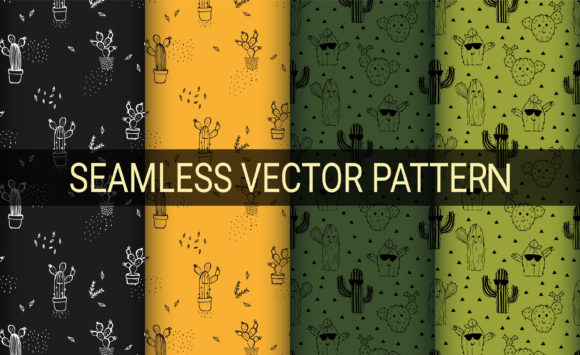
If you have ever tried to build a cohesive design project around a desert or botanical theme, you know how quickly sourcing the right repeat patterns can turn into a frustrating scavenger hunt. Either the motifs are too small, the colors clash, or the file format locks you into a single tool. The Cactus Seamless Patterns Digital Papers set solves that friction in one efficient package. Built around cactus motifs on black, green, and light green backgrounds, this collection offers 100 vector illustrations that repeat seamlessly. More importantly, every element is designed so you can edit, recolor, and scale it without quality loss.
Let us walk through what this product actually contains, where it fits into real workflows, and why the combination of vector structure, royalty-free licensing, and multi-format delivery makes it a practical choice for creators who need reliability over hype.
What makes a seamless pattern truly useful
Seamless repeat patterns are everywhere once you start looking: wallpaper, fabric prints, presentation backdrops, packaging, social media tiles. The difference between a pattern that works and one that causes headaches lies in how it was constructed. If a pattern is built as a raster image, you are stuck with a fixed resolution. Enlarge it for a banner, and you see pixelation. Shrink it for a mobile background, and the file size may still be bloated.
The Cactus Seamless Patterns Digital Papers are delivered as vector files. That means each cactus, line, and stitch exists as a mathematical path, not a grid of pixels. You can scale a single pattern to fit a business card or a billboard, and the edges remain crisp. For anyone who has had to redo a layout because a raster pattern failed at the print stage, this alone saves hours of rework.
Vector structure: the practical difference
Because the set is built with expanded outline paths, you are not dealing with strokes that might shift their thickness when scaled. Every line and stitching detail is converted to a filled shape. This matters when you send a file to a printer or upload it to a print-on-demand platform. There is no stroke-to-outline conversion step left for you to guess. The files are ready to use in Adobe Illustrator (version 10 or newer), and the included AI, EPS, SVG, and JPG formats cover most design pipelines.
If you work in other vector apps such as Affinity Designer, CorelDRAW, or Inkscape, the EPS and SVG versions typically open without compatibility issues. That kind of format flexibility reduces the friction of switching tools or collaborating with someone who uses different software.
What is inside the 100-pattern collection
The set contains one hundred distinct seamless patterns. Each pattern is a vector illustration with cactus motifs arranged so the edges match perfectly when tiled. The backgrounds are isolated in three color families: black, green, and light green. This range gives you options for high contrast, natural tone, or pastel-leaning backgrounds without needing to crack open a color editor for every single file.
Because all files are royalty-free, you can use them in commercial projects, client work, merchandise, or educational materials without paying per-use fees or tracking attribution. For freelancers and small business owners, that licensing simplicity removes a layer of legal uncertainty.
Easy color changing and customization
The product description emphasizes easy color changing, and this is where vector structure really pays off. In Illustrator or any app that supports direct editing of AI or EPS files, you can select a cactus shape and change its fill color in seconds. If your brand uses a specific teal or a warm olive tone, you can adapt any pattern to match your palette. You are not limited to the green and light green variants that come pre-made.
This is particularly valuable for marketers and bloggers who need to maintain consistent branding across multiple assets. Instead of searching for a pattern that happens to match your brand colors, you take one that fits the composition and adjust the colors yourself. The same logic applies to textile designers who need to match Pantone references or screen printers who work with a limited ink set.
Real-world applications across different environments
A collection of one hundred seamless patterns is not a one-project tool. The volume alone suggests multiple uses over time. Here are some practical scenarios where this set fits naturally.
Wallpaper and home decor
Digital wallpaper design requires repeats that do not show hard seams and that look good at various room scales. The cactus motifs, when scaled up or down, maintain their visual balance. For interior designers or Etsy shop owners who sell digital wallpaper files, having one hundred ready-to-sell patterns accelerates product launches. You can offer black-background options for accent walls and green-background versions for children's rooms or bohemian interiors.
Textile and fabric printing
Spoonflower, Printful, and similar print-on-demand services accept vector or high-resolution raster files. Since this set includes JPG previews for quick uploads and vector files for professional printing, you can test a small run of cactus-print fabric with confidence. The stitch-like lines in many of the patterns add a handcrafted feel that works well on canvas, linen, or cotton blends. For fashion designers or hobbyists experimenting with custom apparel, the scalability means you can print a single dress or an entire production roll using the same file.
Digital backgrounds and presentations
Bloggers, educators, and content creators frequently need background tiles for virtual classrooms, webinar slides, or social media graphics. A black-background cactus pattern can serve as a dramatic backdrop for text overlays, while a light green variant works for a softer, more approachable aesthetic. Because the files are SVG-capable, you can embed them directly into web projects without losing quality on retina displays.
Packaging and product branding
Small-batch product packaging often benefits from distinctive patterns. Soap wrappers, candle labels, tea tins, and gift boxes can use a cactus pattern as a wrap or insert. The ability to recolor the pattern in Illustrator means you can create seasonal variations or limited-edition runs using the same base artwork. For entrepreneurs who handle their own packaging design, this reduces the need to commission new illustrations for every product variant.
Practical considerations when using the set
Even a well-designed pattern collection requires some setup to get the best results. Here are a few observations based on how vector seamless patterns behave in production workflows.
File handling and organization
The main file arrives as a zipped folder containing AI, EPS, SVG, and JPG versions. Before starting a project, extract the folder and organize the patterns by background color or by motif density. Naming files consistently from the start saves time when you are hunting for a specific pattern later. If you plan to sell products using these patterns, keep copies of the original unedited files separate from your working files. That way you can always return to the source if a customization goes off track.
Scaling expectations
Vector files scale infinitely in theory, but practical scaling depends on the complexity of the pattern. A dense pattern with many small cactus shapes and stitch lines will increase in rendering complexity as you scale it up. For large-format printing, test a small tile at print resolution before committing to the full run. In most vector apps, you can reduce the number of anchor points if the file becomes too heavy for your system.
Color editing in practice
To change colors efficiently, use the direct selection tool or the global color swatches in Illustrator. If the pattern uses a limited palette, you can reassign colors in seconds. If the pattern has many overlapping shapes with different tints, a quick test run on a tile will show you whether the contrast shifts in an unintended way. Because the patterns are expanded outlines, there are no stroke settings to worry about, which simplifies the process considerably.
Why format variety matters across teams
Not everyone on a team uses the same software. A graphic designer may work in Illustrator, a web developer may prefer SVG, and a print shop may request EPS. By having all four formats in a single zip, the set reduces back-and-forth requests. For freelancers who subcontract printing or work with overseas manufacturers, sending an EPS file that opens reliably in older versions of software is a practical advantage. The specification requiring Illustrator 10 compatibility means these files open even in legacy production environments.
Royalty-free licensing: what it means day to day
When the product description says "all design files are royalty-free vectors," it means you do not pay ongoing fees or royalties for using the patterns in your projects. You can incorporate them into a logo, a commercial product, or a client deliverable without tracking usage. For educators and bloggers, this also means you can use the patterns in teaching materials, video backgrounds, or digital downloads without worrying about copyright claims. Always confirm the exact license terms with the seller, but royalty-free generally covers most commercial and personal uses.
Observations on the cactus theme itself
Cactus and desert motifs have remained consistently popular in home decor, fashion, and digital design for several years. They offer a neutral but recognizable aesthetic that suits minimalist, boho, and modern organic styles. Because the patterns in this set vary by background color and motif arrangement, you have room to create contrast between patterns without leaving the theme. That cohesion is difficult to achieve when mixing patterns from different sources.
For publishers and content creators who produce seasonal or regional content, the cactus theme can also evoke specific moods: warmth, resilience, arid simplicity. In educational materials about desert ecosystems, these patterns serve as visually accurate backgrounds without being distracting. In marketing for spa products or wellness brands, the green tones suggest calm and natural ingredients.
Final recommendations for getting value from the set
If you are considering this collection for a specific project, start by identifying which background color aligns with your most immediate need. Black-background patterns tend to work well for high-contrast hero images and dark mode displays. Green and light green patterns fit better as subtle backgrounds behind text or as primary motifs on lighter products.
After selecting a pattern, test its repeat at the scale you plan to use. Tile a small section in your design software and zoom out to check for visible grid lines or awkward motif overlaps. Vector seamless patterns from a professional set should align cleanly, but running a quick test prevents surprises at print time.
Finally, keep the file structure simple. A folder with subfolders for each background color, plus a separate folder for your customized versions, helps you navigate one hundred files without frustration. Over time, a well-organized library becomes a resource you reach for repeatedly. The Cactus Seamless Patterns Digital Papers set is not just a one-time asset; it is a foundation that adapts as your projects evolve.